10 Blue Live
Blue Live lets you trigger SoundObjects while a project runs in Csound. Open the Blue Live panel from Window → Editors, then start the engine with the Blue Live toolbar button. Recompile restarts it with the current project, and All Notes Off releases sounding notes.
Blue Live uses the project’s orchestra, instruments, tables, UDOs, mixer, and Global Score. It does not play the main Score timeline. Keep long-running effect notes in Global Score or use an always-on instrument. Changes to orchestra code generally need Recompile; the Live Code editor also lets you evaluate a line or block while Blue Live or realtime playback is running.
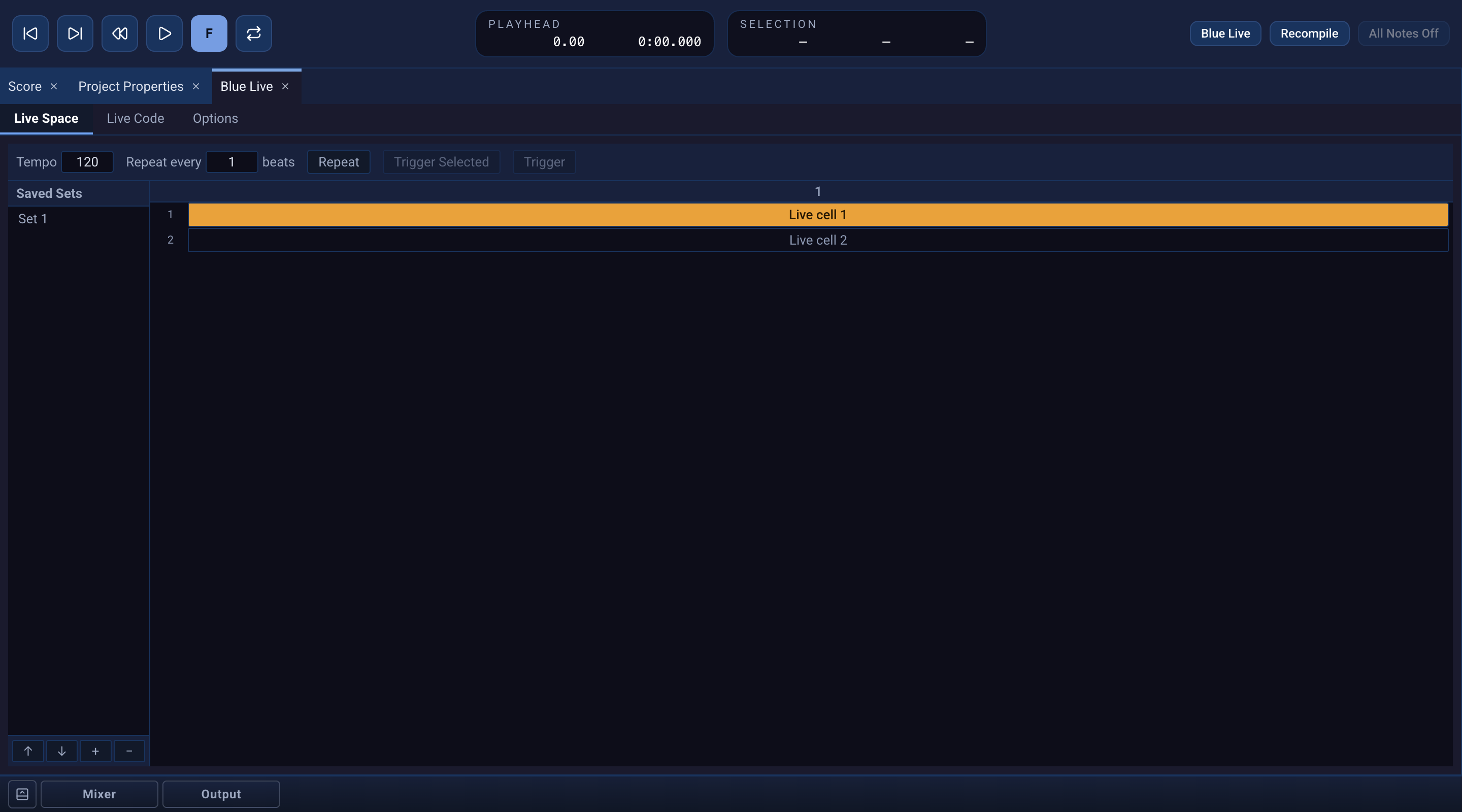
10.1 Live Space
The Live Space tab is a grid of SoundObject cells. Right-click an empty cell to add an available object, or copy and paste objects between the grid and Score. Select a cell to edit its object. Double-click it to toggle its enabled state; enabled cells are highlighted.
Trigger Selected sends the selected cell’s generated notes to the running engine. Trigger sends all enabled cells. With focus in Live Space, use Cmd/Ctrl+T and Cmd/Ctrl+Shift+T, respectively. The toolbar’s Tempo value controls triggering. Blue Live applies the object’s Note Processors; inspect generated notes if their timing or instrument is unexpected.
You can save and recall sets of enabled cells in the Live Space panel. Set Repeat to the number of quarter-note beats between triggers, then turn on the Repeat toggle to retrigger all enabled cells while Blue Live runs. The interval is Repeat × 60 ÷ Tempo seconds. Tempo and Repeat edits take effect without recompiling; disabling Repeat or stopping Blue Live cancels the schedule. With no enabled cells, the scheduled trigger submits no score.
10.2 MIDI input routing
The Virtual Keyboard panel’s Routing selector applies to both the Virtual Keyboard and enabled hardware MIDI inputs. In Focused Target mode, new notes go to the focused Track or Orchestra assignment, regardless of the input channel, when that assignment has an enabled instrument in the compiled target list. Click a Track’s timeline or layer row, or its instrument control, to focus that Track. Select an Orchestra assignment row in Arrangement to focus it. If no eligible target is focused, new notes are not sent to an instrument.
In Direct Channel mode, MIDI channel 1 routes to the first Orchestra assignment, channel 2 to the second, and so on through channel 16 and the sixteenth assignment. The assignment must be enabled and have an instrument. Hardware MIDI uses the channel carried by each message; the Virtual Keyboard uses its Channel value.
10.3 Live Code and options
The Live Code tab stores Csound orchestra text with the project. While Blue Live or realtime playback runs, Cmd/Ctrl+Enter evaluates the current line or enclosing block. This is useful for trying orchestra changes before recompiling the project.
The Options tab contains an optional Blue Live command line and an override switch. Leave these at their defaults unless you need custom Csound flags. See Project Properties for the project’s regular realtime and disk render settings, and Settings for device configuration.
The older Java Blue manual describes an SCO Pad and a toolbar MIDI Input toggle; those are not part of the current Blue 3 workflow. Java Blue and Blue 3 both preserve legacy key and MIDI trigger fields on Live cells for project compatibility, but neither has an assignment UI or uses those fields to trigger cells. Blue 3’s MIDI input device preferences are configured separately in Settings.