22 PatternObject
PatternObject is a step grid for triggering short Csound score phrases. Each row has its own score text; each active cell starts that phrase at a subdivision of a beat. It is useful for repeated rhythms, pulses, and layered figures. It is a SoundObject on the main Score, distinct from a Score Pattern layer.
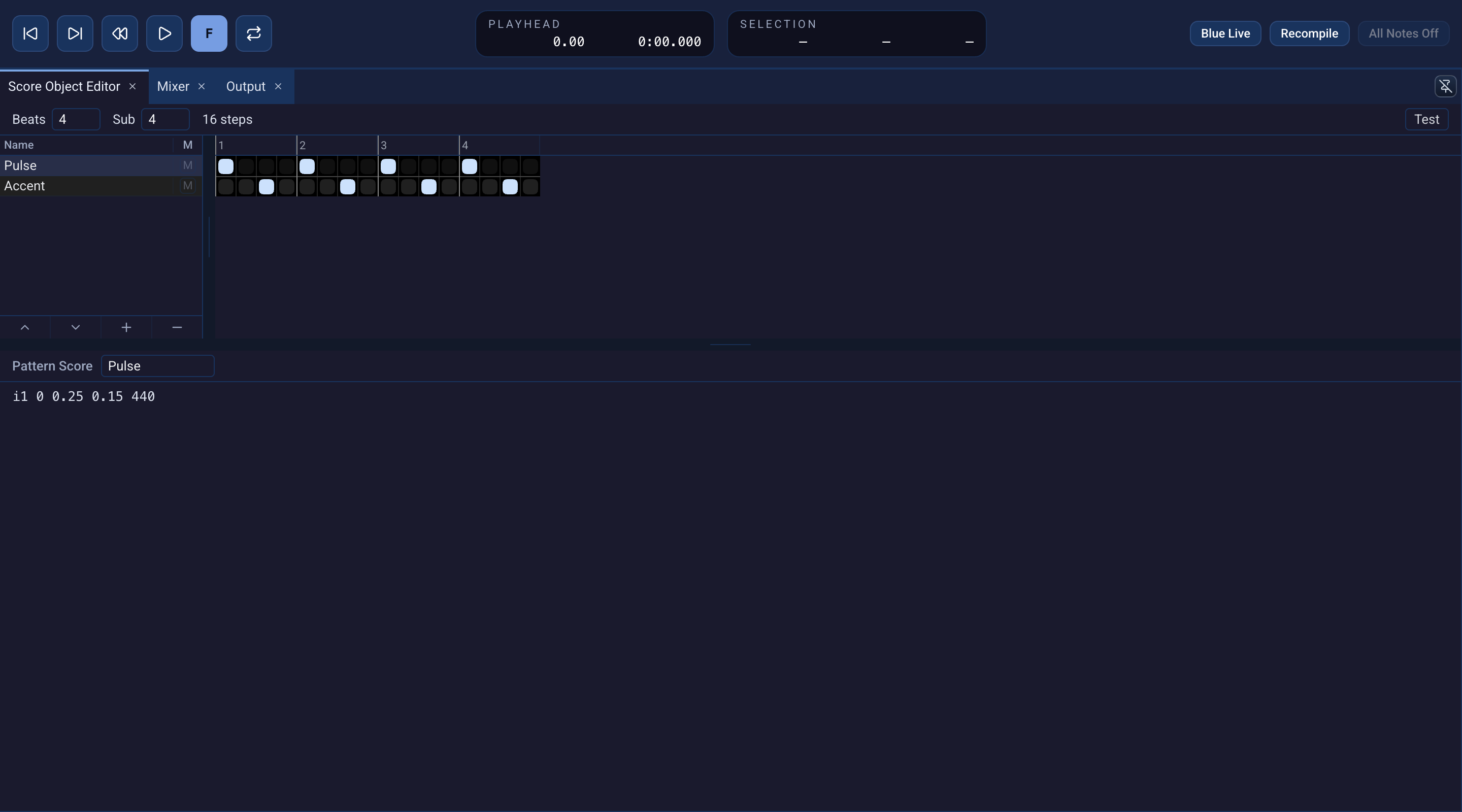
22.1 Build a simple pattern
Right-click a SoundObject layer and choose Add SoundObject → PatternObject. Double-click the object to open its editor.
Set Beats to
4and Sub to4. The editor shows 16 steps, four subdivisions per beat. Set these values before filling the grid so each trigger has the intended beat position. Changing Beats keeps triggers in the steps that remain visible; shortening the grid removes later triggers, and expanding it adds empty steps. Changing Sub clears the grid because the old step positions no longer represent the same times. Use Test to check the result after resizing.Click + under the pattern list to add a row. Give the row a useful name in Pattern Score and enter a short score phrase starting at local time zero, for example:
i1 0 0.25 0.15 440This uses instrument ID
1and thep4amplitude,p5frequency order from First project.Click cells in the row to turn triggers on or off. With four subdivisions per beat, steps 1, 5, 9, and 13 trigger the phrase at beats 0, 1, 2, and 3. Drag across cells to fill or clear several at once.
Click Test to inspect the generated score, then use Project → Generate CSD to Screen to see it with the rest of the project.
The score text is copied at each enabled cell’s time. If a row’s phrase lasts longer than one subdivision, its notes may overlap phrases triggered by later cells. The grid marks trigger positions, not the full duration of every generated note.
22.2 Work with rows and duration
Add rows for other phrases or instruments. Select a row to edit its name and Pattern Score. The M control mutes a row without deleting its grid. The controls below the list move a selected row up or down, add a row, or remove one. A muted row remains in the project but generates no notes while muted.
A new PatternObject has Repeat time behavior. Stretching its visible width can therefore repeat its generated material. Open Score Object Properties to choose Repeat, Scale, or None, and set a repeat point when a specific loop interval matters. Blue 3 uses the configured Beats length as the source length for Scale and Repeat, even when the last steps are empty. Thus a four-beat grid with triggers only in its first two beats retains its quiet tail when repeated at a four-beat interval. A phrase that extends past a cycle boundary can be clipped by Repeat. Inspect Test or generated CSD when the apparent grid length and audible phrase differ. See SoundObjects for time behavior and Time for beats, subdivisions, and snap.
For directly written events without a step grid, use GenericScore. For drawn pitched notes, use PianoRoll.